Coding Sequence
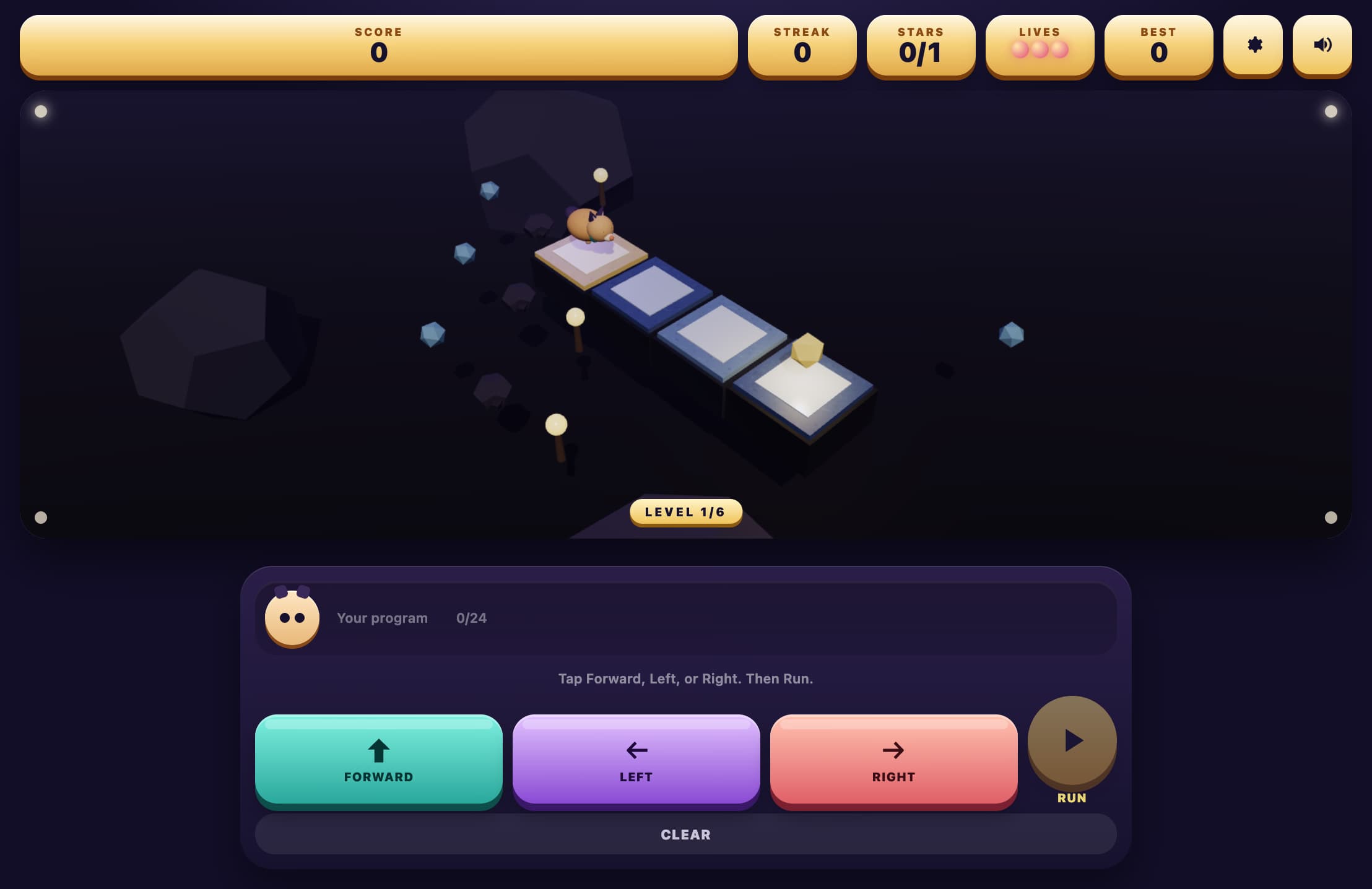
Build a short program with Forward, Turn Left, and Turn Right blocks, then run it so a beetle walks an isometric path and picks up every apple. Kids practice sequencing without typing code.
More like this
How to Play Path Blocks
Look at the Path
The beetle starts on one tile and faces a direction. Apples are the goals. Pink worms are tiles to avoid.
Build a Sequence
Tap Forward to walk one tile the way the beetle is facing. Tap a turn to spin in place. The tray shows the program in order.
Run It
Press Run. The beetle follows the blocks from left to right. Press Clear to wipe the tray and try again.
Collect Every Apple
Land on each apple. If the beetle walks off the path or onto a worm, the run fails and you edit the sequence.
Key Features
Three Command Blocks
Tap Forward, Turn Left, or Turn Right to grow a program. Tap a block in the tray to take it out.
Run the Path
Press Run and watch the beetle step one command at a time. Collect every apple. A worm or a missing tile stops the run.
Grass and Stone Paths
Each level is a short floating path. Easy is one turn. Hard adds a second apple and a worm to avoid.
Score on the Board
Level, apples left, and score sit in boxes above the path so progress stays visible.
What is Path Blocks?
Path Blocks is a first coding game. Players do not type. They tap visual blocks to write a sequence of moves, then run that sequence so a beetle walks a path of floating tiles. The core idea is an algorithm: an ordered list of steps that either reaches every apple or does not. Turns happen in place, and Forward always means the way the beetle is currently facing.
Why Play Path Blocks?
Teaches Sequencing
Kids see that order matters. Two Forwards and then a turn is not the same as a turn and then two Forwards.
Makes Facing Concrete
Left and right are relative to the beetle, not the screen. That is the same idea used later in Logo, Scratch, and robot kits.
Debug by Watching
A failed run shows exactly where the path went wrong. Students change one block and try again.
Works on Touch
No drag required. Tap to add, tap to remove, tap Run. The tray is large enough for small hands.
Frequently Asked Questions
Do I have to drag the blocks?
No. Tap a command to add it to the tray. Tap a block in the tray to remove it.
What does a worm do?
A worm is a hazard. If the beetle lands on that tile, the run stops and you can edit the program.
What do the levels change?
Easy paths are short with one apple. Medium adds a second turn. Hard uses two apples and a worm to walk around.
Can I step one command at a time?
Yes. Use Step to run a single block, or Run to play the whole tray.
What grade is this for?
Kindergarten through fifth grade. Easy is a first sequencing lesson. Hard is useful once students are comfortable with left and right from the character's view.