Coding Delivery Missions
Robot Route Programmer
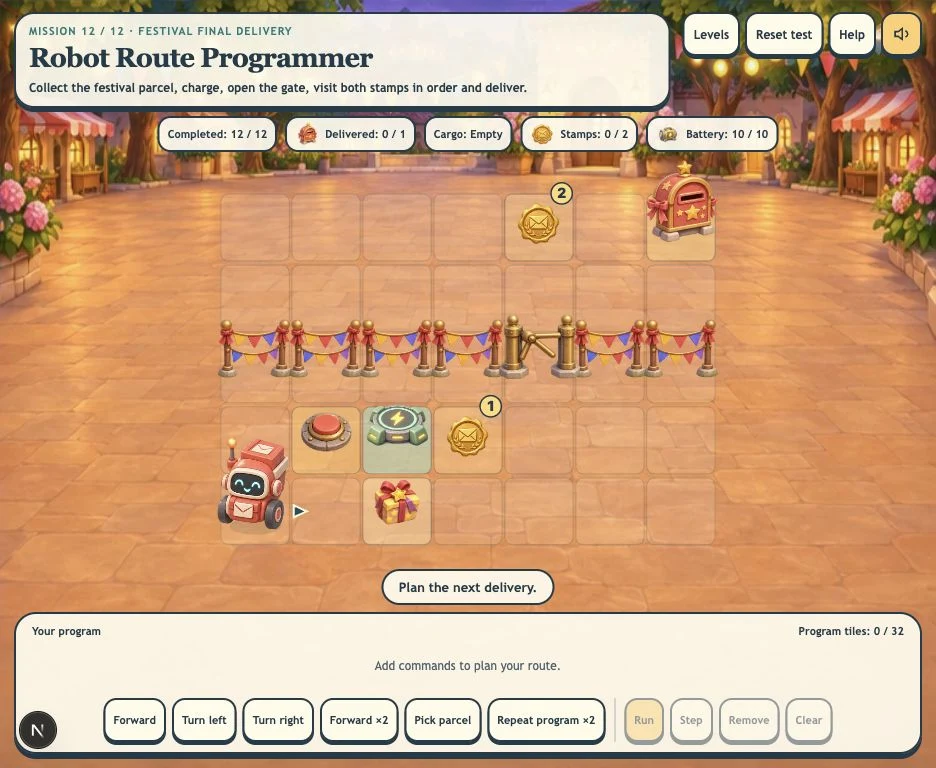
Program a mail robot through 12 illustrated delivery missions. Collect parcels, open gates, recharge, protect fragile cargo and debug routes with selectable command tiles.
More like this
How to play Robot Route Programmer
- 1
Read the delivery brief
Each location has a different job. The robot begins carrying a letter in early missions; later missions use Pick parcel, ordered stamp stops, switches, charging and matching mailboxes.
- 2
Build, test and edit
Add Forward, turns, Forward ×2 and any special commands available in the current mission. Select Run or Step. Tap a program tile and then a command to replace it; Remove deletes that tile. Reset test keeps the program.
- 3
Complete the mission
Deliver all required parcels after completing the listed stops. Later missions add Repeat program ×2, limited program space and a starter program to debug. Choose Next level or Replay mission when the job is complete.
Key Features
12 delivery locations with their own art
Travel from a sunny depot through gardens, a harbor, snow, a greenhouse, a railway station, desert, Moon, canal and festival. Each mission has its own background, mailbox, parcel and obstacle artwork.
Jobs that change how you plan
Pick up parcels, make return trips with one cargo space, visit stamps in order, open a gate with a switch, recharge a movement battery and keep fragile cargo off rough stones.
Repeat and debug real sequences
Repeat program ×2 repeats all earlier commands once. A short-program Moon mission uses repetition, while the canal job starts with a broken turn to diagnose and replace.
Inspect each command
Run or Step through the route, select a tile to replace it, and use Remove to delete a tile. Reset test preserves your plan. Touch, mouse and keyboard are supported, with optional music and locally saved mission progress.
What is Robot Route Programmer?
A browser coding game built around a mail robot’s delivery journey. Twelve authored missions introduce different planning constraints across distinct illustrated settings. Replay can mirror the route; those variations support practice rather than count as additional levels.
Learn by planning and revising a route
- 1
Sequencing and debugging
Watch a visible robot execute your commands, identify the point where a plan goes wrong, and replace that command.
- 2
Plan around real constraints
Make decisions about cargo capacity, delivery order, battery range, gates and safe routes for fragile parcels.
Frequently Asked Questions
Are the 12 missions just different obstacle arrangements?
No. The missions introduce pickup, one-parcel capacity and return trips, ordered stamp stops, switch-controlled gates, charging, fragile cargo, matching destinations, repetition and debugging. Each has a distinct illustrated location. Some early missions focus on basic movement and turning.
What does Repeat program ×2 do?
It repeats every command before that tile once. Earlier repeat expansions are included. The Moon mission asks you to use this repeated sequence within a five-tile program limit.
How do I edit a command?
Tap the program tile you want to change, then select a command to replace it. Remove deletes the selected tile, or the last tile if none is selected. Reset test returns to the same route without deleting your program.
Does the game require typing or a real robot?
No. Commands are selectable buttons. The game runs on tablets and desktop browsers and does not connect to physical robots. Optional shortcuts include W/A/D, arrow keys, P for Pick parcel and X for Repeat program ×2.