Area of Polygons
Kite Workshop
Cut colorful kite fabric into simpler shapes on a coordinate grid. Connect two marked points to make two rectangles, or a rectangle and a triangle, and watch the areas combine. Build six kites for the seaside festival, with new dimensions on replay.
More like this
How to Play Kite Workshop
- 1
Read the pattern
The first kite is already on the workbench. Read the instruction and inspect the grid. Each grid step is 1 unit.
- 2
Choose two points
Tap two marked points to make a cut. Use the first point as one end and the second as the other end. With a keyboard, use Tab to focus a point and Enter or Space to select it.
- 3
Adjust your cut
A red cut means the two pieces are not the requested rectangles or rectangle and triangle. Try another pair of points. Clear cut removes a pending selection or a rejected cut.
- 4
Read the two areas
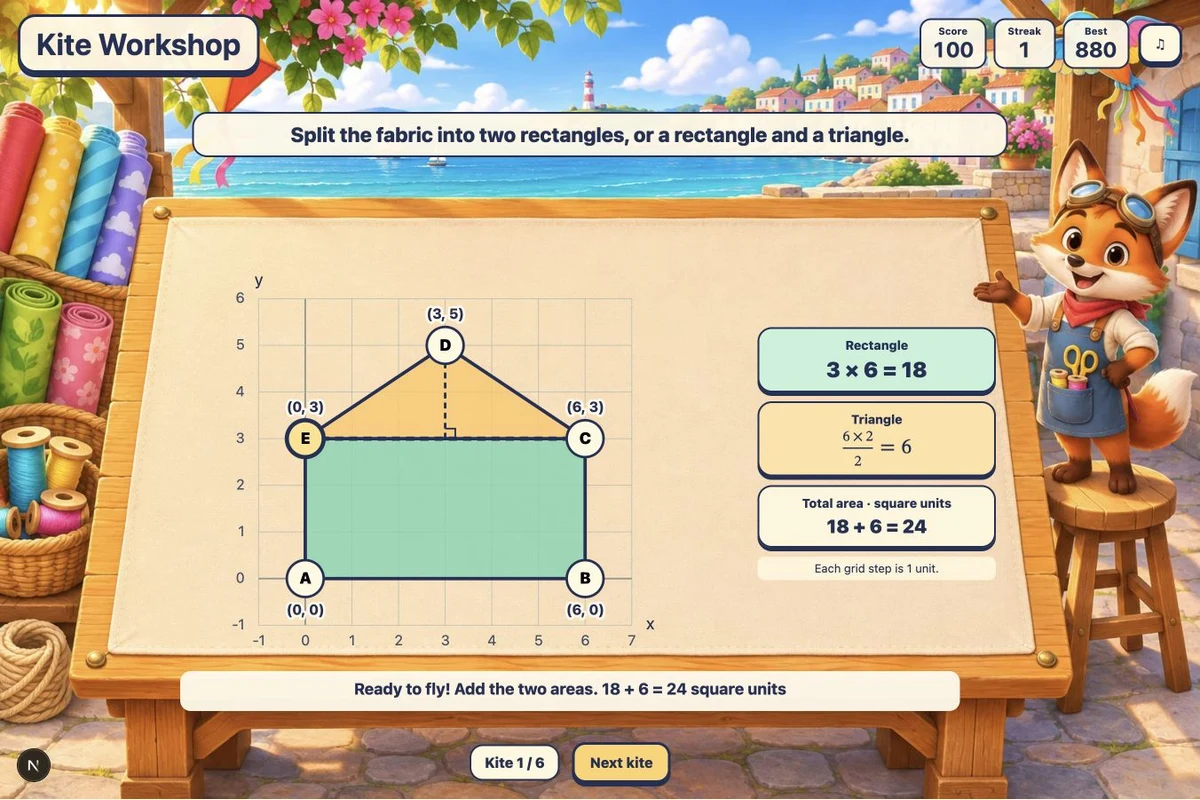
A valid cut colors both pieces and shows their calculations and total area in square units. For a rectangle 6 units wide and 3 units high with a triangle of base 6 and height 2, the total is 18 + 6 = 24 square units.
- 5
Build the festival set
Select Next kite after a successful cut. After six kites, Play again starts a fresh set and resets Score and Streak while keeping Best.
Key Features
Make a real cut
Tap two marked points on the fabric. A valid cut separates the pattern into two colored pieces. Invalid cuts stay visible in red so you can compare them with the shape and try again.
Three pattern families
House-shaped pentagons, L-shaped patterns, and right trapezoids ask for different cuts. Dimensions, reflections, and grid positions vary. Some L-shaped patterns accept two different cuts.
Read the coordinate grid
Each grid step represents one unit. Point labels give coordinates, including negative coordinates in later rounds. Measure differences between coordinates rather than using a point coordinate as a side length.
See area added automatically
The finished pieces show rectangle height × width and triangle base × perpendicular height ÷ 2. The total appears immediately after a valid cut; no typed answer or extra calculation check is required.
Six kites with unlimited retries
Each valid cut adds 100 points plus a streak bonus of up to 80. An invalid cut resets Streak without removing points. Best and the sound preference stay in this browser when storage is available. There is no timer.
What is Kite Workshop?
Kite Workshop is a sixth-grade geometry game about finding polygon area by decomposition. The fabric patterns represent a practical area problem: how much material is needed for each kite? You choose where to cut, then the game shows how the simpler pieces account for the entire original shape. For the first pattern, a 6-by-3 rectangle sits under a triangle with base 6 and perpendicular height 2. Join the two shoulder points. The rectangle has area 3 × 6 = 18 and the triangle has area 6 × 2 ÷ 2 = 6. Together they cover 24 square units. The triangle uses perpendicular height, not a sloping edge. Later shapes change the useful cut, and coordinates can lie on either side of zero.
Why Play Kite Workshop?
- 1
Connect cuts to formulas
The cut you make determines the two visible pieces, and each piece has its own matching area calculation.
- 2
Measure on a coordinate plane
Coordinate labels and unit grid lines connect side lengths with differences between point coordinates.
- 3
Use triangle height correctly
A dashed perpendicular height and right-angle mark show which distance belongs in the triangle calculation.
- 4
Retry without a countdown
Rejected cuts remain visible, and you can revise your choice as often as needed. New dimensions on replay extend the practice.
Frequently Asked Questions
Which polygons appear?
Each run includes house-shaped pentagons, L-shaped polygons, and right trapezoids. The first pattern has a fixed example; later rounds and replays vary dimensions, reflections, and position.
Can I make any mathematically valid cut?
The game accepts the marked-point cuts that produce two rectangles or one rectangle and one triangle. A cut into two triangles or other polygons is outside this task. L-shaped patterns can have two accepted decompositions.
Do I enter the total area?
No. Once your cut creates the requested pieces, the game calculates both areas and adds them automatically. Read the colored pieces alongside their calculations.
How are points awarded?
A successful kite adds 100 points plus 20 for each previous consecutive success, capped at an 80-point bonus. Six successes without an invalid cut earn 880 points. Invalid cuts reset Streak but never subtract Score. Clear cut does not change points.
What does the grid measure?
Each step is one unit in either direction. A rectangle from x = −3 to x = 3 is 6 units wide. Area is measured in square units, not units along the boundary.
Does it work on tablets and keyboards?
Yes. Tap or click marked points, or focus them using Tab and press Enter or Space. The sound button toggles quiet background music. There is no time limit and no typing.