Graph Inequalities on a Number Line
Firefly Range
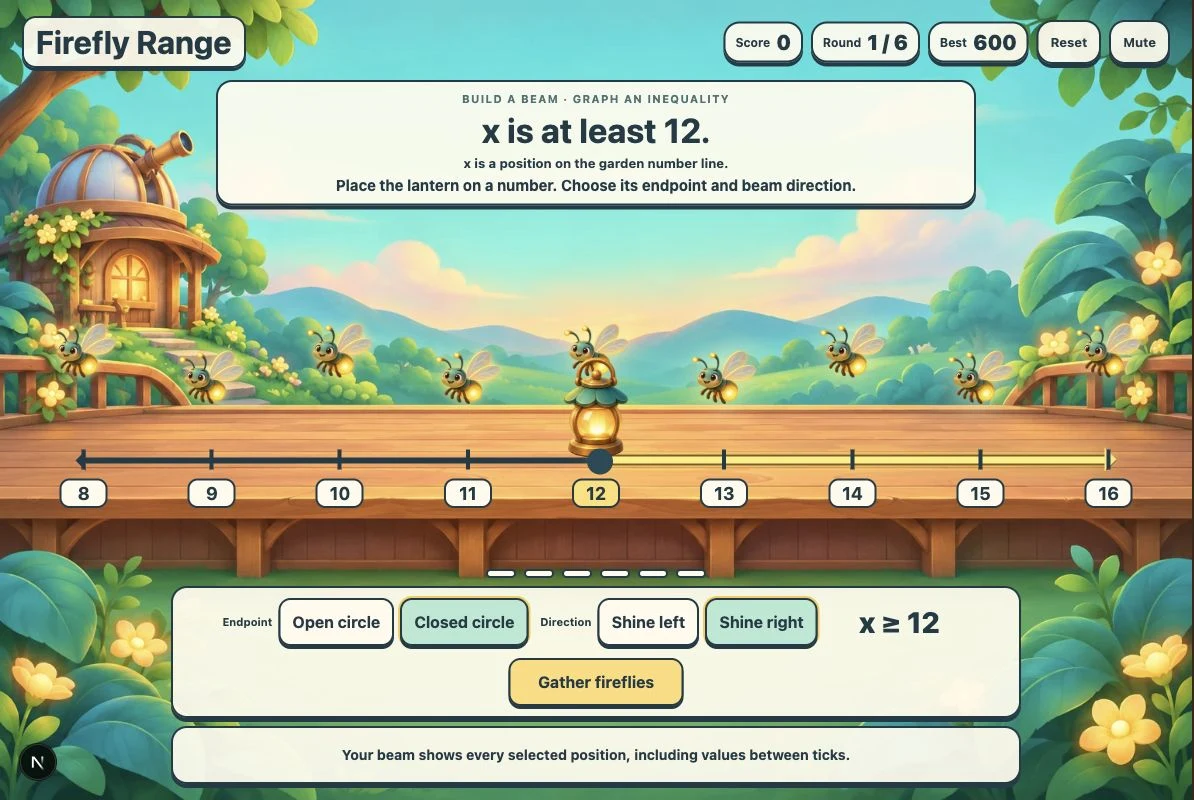
Build a lantern beam that matches an inequality. Place its boundary, choose an open or closed circle, and shine left or right to gather fireflies. Six untimed rounds connect words, symbols, and a continuous number-line graph.
More like this
How to play Firefly Range
- 1
Read the range
Read the request above the garden. x represents a position, not the number of fireflies.
- 2
Place the lantern
Tap or click the tick at the boundary number. Keyboard players can Tab to a tick and press Enter or Space.
- 3
Build the beam
Choose Open circle for less than or greater than, or Closed circle for at most or at least. Choose Shine left for smaller values or Shine right for larger values.
- 4
Gather fireflies
Check the live inequality, then select Gather fireflies. Correct models gather the matching fireflies and add 100 points. Otherwise, use the feedback to revise the model and try again.
- 5
Light six ranges
Select Next range after success. After round six, choose Play again. Use Reset at any time for a fresh run, or Mute to turn off the background music.
Key Features
A movable lantern
Select any of nine labeled number-line ticks to move the boundary. The scene updates immediately; no answer typing or dragging is required.
Endpoint and direction controls
Open circle and Closed circle set inclusion. Shine left and Shine right select smaller or larger values. The generated inequality reflects your choices.
Specific retry feedback
Gather fireflies checks boundary, endpoint, and direction. A mismatch keeps the round open and explains which part to reconsider.
Six-round runs
The first visit compares at least 12 with greater than 12. Later ranges vary the comparison and include signed boundaries. Play again starts a fresh six-round run.
Score, music, and saved best
Each completed range adds 100 points. Best and the Sound or Mute preference are saved in this browser when storage is available. Reset starts a fresh run with Score 0.
What is Firefly Range?
Firefly Range is a garden game about solution sets. A request such as x is at least 12 describes the positions to light. You move a lantern by selecting a tick, choose whether the boundary belongs, and send its beam toward smaller or larger numbers. The graph and inequality change together. For x is at least 12, place the lantern at 12, choose Closed circle, then Shine right. Your model reads x ≥ 12. Gather fireflies checks the whole model and draws the matching fireflies toward the lantern. The continuous beam includes 12, 12.5, 13, and every larger value, even beyond the visible line. For x is greater than 12, use Open circle instead: 12 itself is excluded.
Why play Firefly Range?
- 1
Connect three representations
Read a verbal condition, build its graph, and see the matching inequality update as you work.
- 2
Reason about the boundary
Open and closed circles distinguish strict comparisons from at least and at most. Feedback explains whether the boundary belongs.
- 3
See many solutions
A continuous beam and an arrow show that a solution set includes values between ticks and continues beyond the visible window.
- 4
Practice without a timer
Adjust a model after feedback without losing points. Six rounds give a clear finish, and replay draws fresh ranges.
Frequently Asked Questions
What is the difference between an open and a closed circle?
An open circle excludes the boundary, as in x > 12. A closed circle includes it, as in x ≥ 12. At least and at most include equality.
Does the beam include only the labeled integers?
No. The continuous beam represents every position in the solution set, including values between ticks. Its arrow means the set continues beyond the visible number line. Fireflies are sample positions, not the entire solution set.
How is scoring calculated?
Each correct range adds 100 points, up to 600 in a six-round run. Incorrect attempts do not remove points. Best is saved locally when browser storage is available; Reset and Play again clear only the current score.
Do rounds change on replay?
Yes. The initial visit begins with at least 12 and greater than 12 so the endpoint difference is visible. Remaining rounds and replays draw from shuffled strict and inclusive comparisons with boundaries from −12 to 18.
Can I play with touch or a keyboard?
Yes. All ticks and controls are buttons. Tap, click, or use Tab followed by Enter or Space. There is no typed answer, time limit, or required setup screen.
Can I switch off music?
Use Mute in the header. Sound turns it back on. The preference is saved locally when possible, and music pauses while the page is hidden.