Add and Subtract Angles
Angle Lighthouse
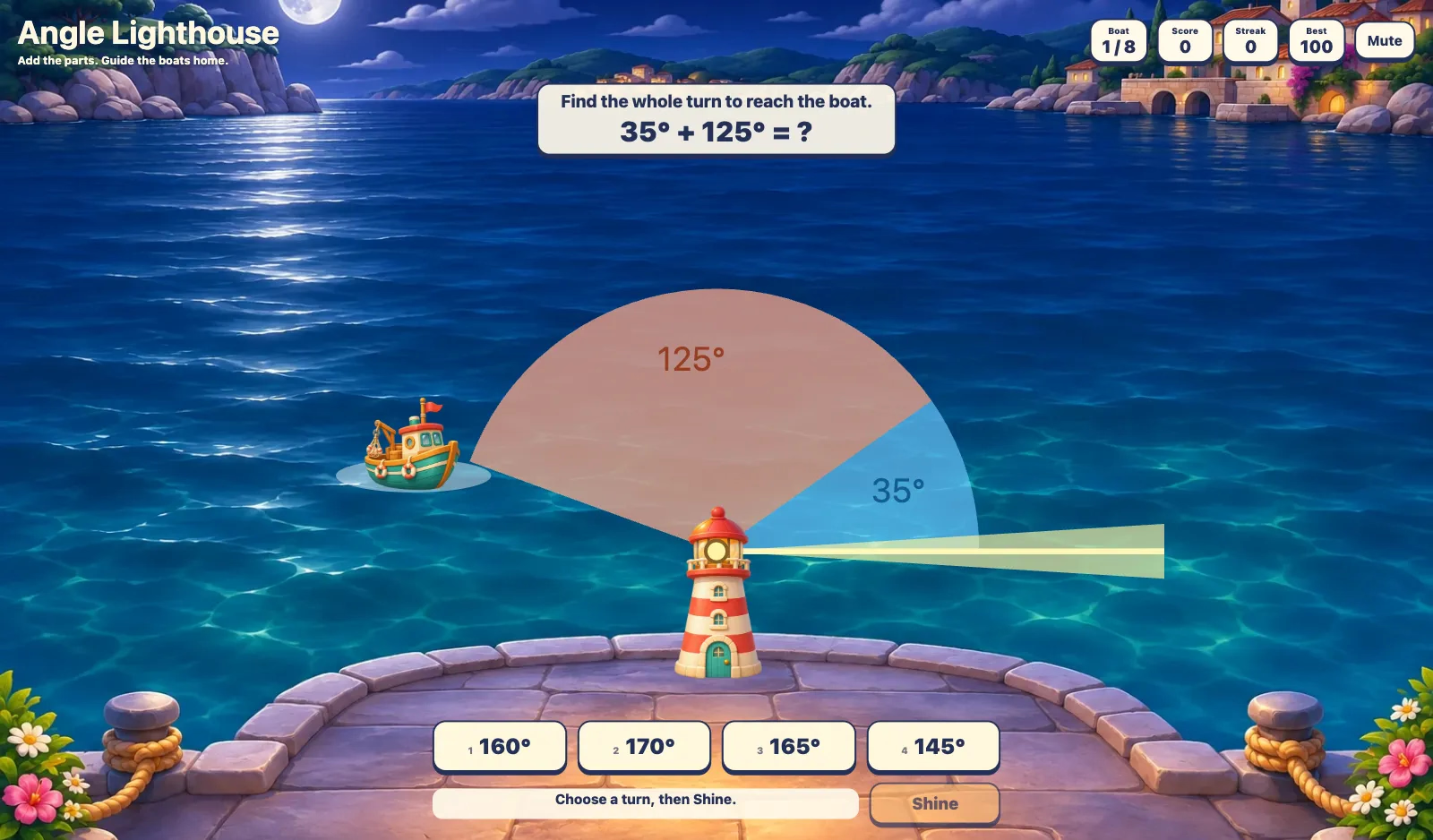
Aim a lighthouse beam to guide eight boats home. Add two adjacent angles to find a whole turn, or subtract a known part to find the missing turn. Choose an angle, watch the beam move, and press Shine to signal the boat.
More like this
How to Play Angle Lighthouse
- 1
Read the harbor task
The first boat is ready immediately. Read the two colored angle parts and the equation. Find the whole turn for an addition task, or the missing coral part when the whole is given.
- 2
Aim the beam
Select a degree button. For a whole-angle task, the beam turns from the starting ray. For a missing-part task, it starts after the blue part and turns through your chosen amount.
- 3
Shine
Press Shine to send the signal. If the beam misses, use the hint and choose another angle. If it reaches the boat, the complete equation appears and the boat sails home.
- 4
Next boat
Press Next boat after a rescue. Score rises by 100 for each boat. Streak counts consecutive correct signals and resets after an incorrect signal.
- 5
Play again
After eight boats, the harbor celebrates the completed voyage. Press Play again for a new set with Score and Streak reset. Best and the sound preference remain saved locally.
Key Features
Steer a working beam
Choose one of four degree buttons to rotate the lighthouse beam. Shine sends the signal in that direction. A correct aim lights the boat and brings it toward the quay.
Parts and whole
Blue and coral sectors share a vertex and a side. Addition rounds ask for the whole angle; missing-part rounds show the whole and one part. Right-angle and straight-angle rounds include 90° and 180° totals.
Eight-boat voyages
Each run mixes addition and subtraction across eight boats. Problems are drawn from shuffled decks of angles in 5° steps, so replays bring fresh calculations.
Feedback without a timer
An incorrect signal stays on the same boat and gives an addition or subtraction hint. There are no lost lives or time limits. Each rescued boat adds 100 points; a wrong signal resets the streak.
Touch and keyboard
Tap or click degree buttons, or use number keys 1–4. Press Enter to Shine or advance. Sound and Best are saved in this browser; the current voyage restarts on reload.
What is Angle Lighthouse?
Angle Lighthouse is a fourth-grade geometry game about adding adjacent angles and subtracting a known part from a whole. The two colored sectors meet at the lighthouse lamp: they share one vertex and one boundary ray, with no overlap. The boat waits on the outer ray of the whole angle. For example, blue 35° and coral 55° make a 90° whole turn: 35° + 55° = 90°. On a missing-part task with a 90° whole and a 35° blue part, select 55° because 90° − 35° = 55°. The beam begins at the blue boundary, turns another 55°, and reaches the boat when you press Shine. The diagram and completed equation connect the harbor action to the calculation.
Why Play Angle Lighthouse?
- 1
See adjacent angles
Colored sectors make the common vertex, shared side, and combined angle visible in one harbor diagram.
- 2
Connect addition and subtraction
Alternating tasks show how the same parts-and-whole relationship supports both finding a total and finding an unknown part.
- 3
Practice useful benchmarks
Some boats use 90° or 180° whole angles, while others use different totals, encouraging calculation beyond memorized right-angle pairs.
- 4
Retry with a reason
A missed signal shows which operation to use. Players can adjust their aim without losing a life or racing a timer.
Frequently Asked Questions
What math does the game practice?
It practices adding two adjacent angles and subtracting one known part from a whole angle. Values are multiples of 5°, with positive parts and whole angles up to 180°. It includes right-angle and straight-angle problems.
Why does the beam start at different places?
For addition, you choose the whole turn from the starting ray. For a missing part, the beam starts at the end of the blue part. Your selection supplies only the coral part, so the two turns combine to reach the boat.
What happens after a wrong answer?
The boat stays in place, Score is unchanged, and Streak resets to zero. A hint reminds you to add the parts or subtract the known part. Choose a different degree button and press Shine again.
How are points and Best calculated?
Every rescued boat adds 100 points, including boats rescued after a retry. Eight boats finish a voyage at 800 points. Best stores the highest Score in this browser; Play again resets the current Score and Streak.
Can I play with a keyboard or tablet?
Yes. Tap or click the degree buttons and Shine, or press keys 1–4 to select a choice and Enter to signal or advance. Buttons also support normal Tab navigation. No typed answers are required.
Are replay problems always the same?
No. Addition and missing-part tasks alternate, using shuffled problem decks. Play again continues drawing fresh problems. There is no timer, and the sound button can mute or restore the background music.