Virtuell vibrafon
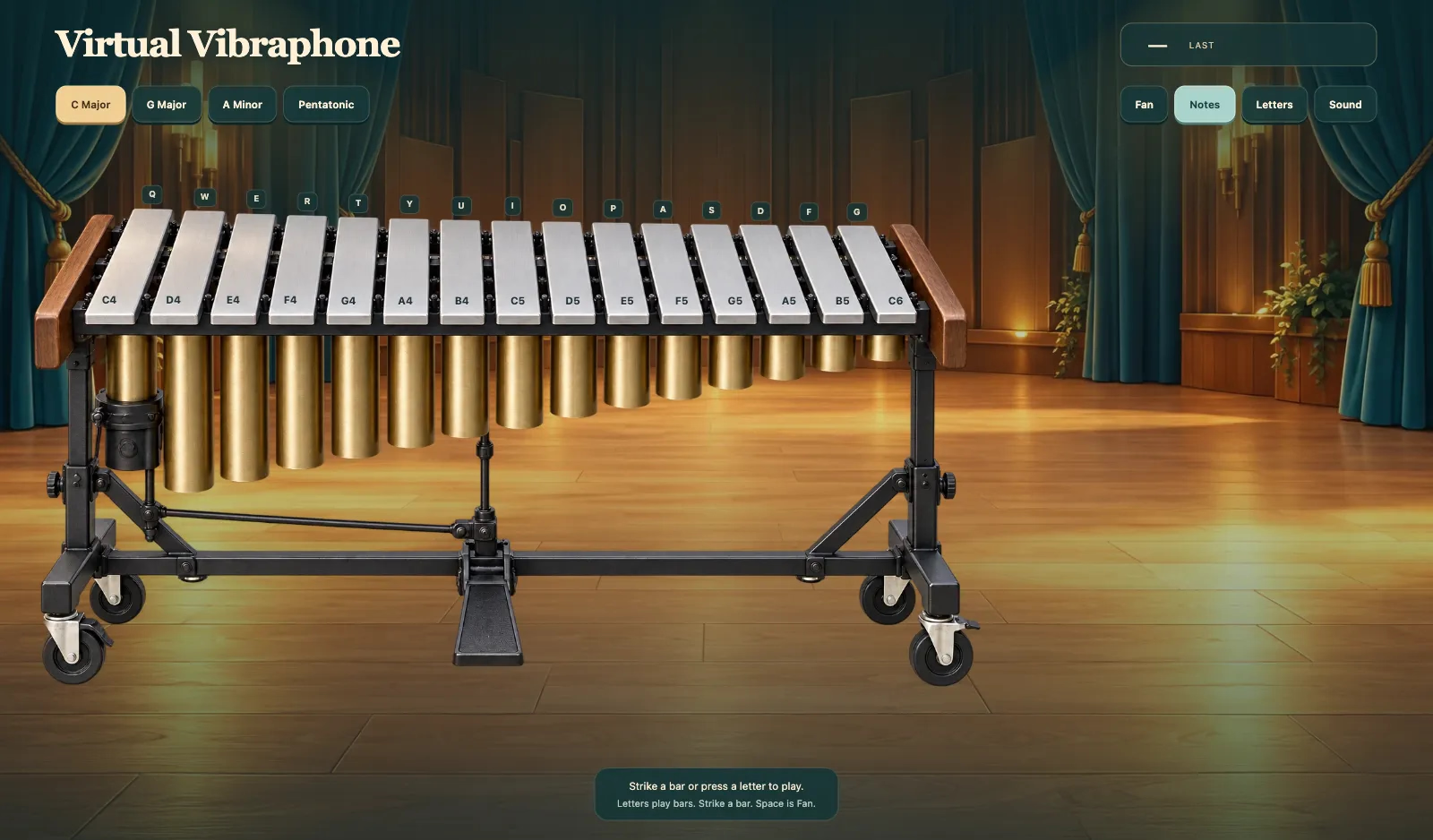
Spela vibrafon online. Slå en stav eller tryck en bokstav för att spela. Toner och Bokstäver märker stavarna. Bokstäver spelar stavar. Slå en stav. Senast visar tonen du just spelade. C Major, G Major, A Minor och Pentatonic stämmer om loungen. Mellanslag är Fläkt. Ljud och Tyst sitter på HUD. Efter Laddar vibrafonen är stavarna redo.
Mer som detta
Så här spelar du Virtuell vibrafon
- 1
Vänta på Laddar vibrafonen
Öppna Virtuell vibrafon och vänta tills Laddar vibrafonen är klar.
- 2
Slå en stav eller tryck en bokstav för att spela
Slå en stav eller tryck en bokstav för att spela. Bokstäver spelar stavar. Slå en stav. Senast visar tonen du just spelade.
- 3
Välj C Major, G Major, A Minor eller Pentatonic
C Major, G Major, A Minor eller Pentatonic stämmer om loungen. Mellanslag är Fläkt. Byt Toner eller Bokstäver.
- 4
Använd Ljud eller Tyst
Ljud och Tyst sitter på HUD. Stäng av ljudet om du behöver en tyst lounge.
Nyckelfunktioner
Spela vibrafon online
Virtuell vibrafon är en loungevagn med aluminiumstavar. Slå en stav eller tryck en bokstav för att spela. Bokstäver spelar stavar.
Toner, Bokstäver och Fläkt
Toner namnger stavarna. Bokstäver spelar stavar och visar tangenterna. Mellanslag är Fläkt. Senast visar tonen du just spelade.
C Major, G Major, A Minor, Pentatonic
C Major, G Major, A Minor och Pentatonic stämmer om stavarna. Ljud och Tyst sitter på HUD.
Laddar vibrafonen
Vänta tills Laddar vibrafonen är klar. Sedan klingar varje stav.
Vanliga frågor
Hur spelar jag Virtuell vibrafon?
Slå en stav eller tryck en bokstav för att spela. Bokstäver spelar stavar. Slå en stav. Mellanslag är Fläkt.
Vad gör Toner och Bokstäver?
Toner sätter tonnamn på stavarna. Bokstäver spelar stavar och visar tangenterna.
Vad är Fläkt?
Mellanslag är Fläkt. Fläkt snurrar skivorna och vaggar klangen.
Vad är C Major, G Major, A Minor och Pentatonic?
C Major, G Major, A Minor och Pentatonic är stämningarna. Varje stämmer om stavarna.
Vad visar Senast?
Senast visar tonen du just spelade.
Varför står det Laddar vibrafonen?
Virtuell vibrafon väcker stavarna först. Sedan kan du slå en stav.