Multi-Robot Traffic Puzzles
Robot Fleet Dispatch
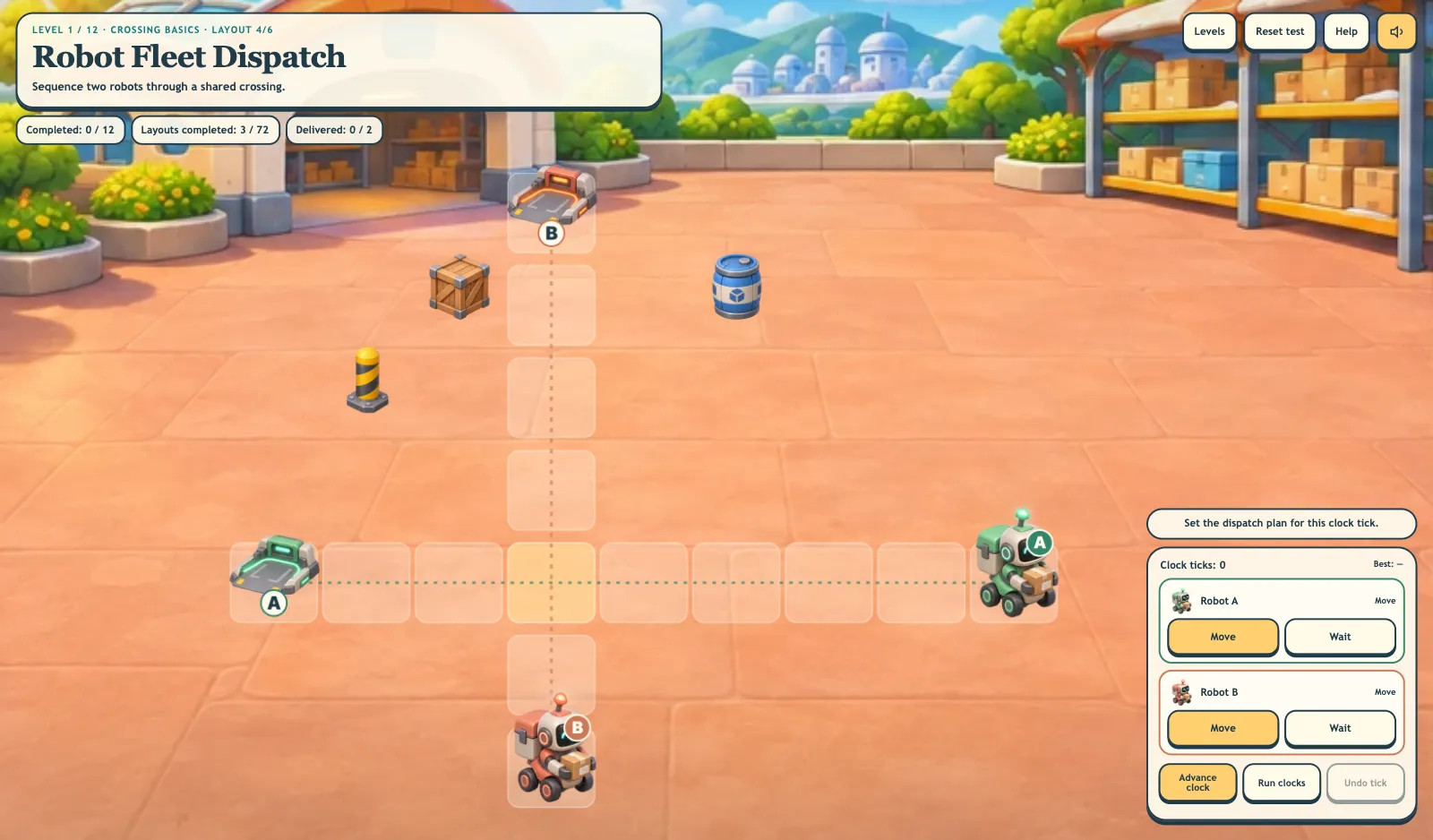
Dispatch two to four robots through 72 layouts across 12 levels. Coordinate crossings, merges, loading, signals, departures and a one-robot bridge in four illustrated logistics yards.
More like this

How to play Robot Fleet Dispatch
- 1
Read the active route job
The game opens directly into the first layout. Follow each robot’s colored route to its matching dock and read the active traffic rule.
- 2
Dispatch one clock tick
Give every robot Move or Wait, then choose Advance clock. You can tap robots in the yard or use keys 1–4 to toggle them.
- 3
Resolve shared space
Watch loading times, traffic signals, departure windows and Priority delivery.
- 4
Finish six layouts
Deliver every robot, then choose Next layout. Replay layout lets you improve the best tick count.
Key Features
Different traffic problems
Plan shared crossings, turning routes, opposing corridors, merging lanes and three- or four-robot grids. Later levels add loading stops, signals, departure windows, priority delivery and bridge capacity.
Six route layouts per level
Each of 12 levels has six distinct route layouts.
Visible robot coordination
Choose Move or Wait, then Advance clock. Colored routes, matching docks, loading counters, traffic lamps and highlighted conflicts make the schedule visible in the yard.
Free level and job selection
Use Levels to choose any level and any of its six challenges. Completion marks are saved independently. Next job or Next layout continues the usual sequence, while manual selection stays open.
What is Robot Fleet Dispatch?
Dispatch two to four robots through 72 layouts across 12 levels. Coordinate crossings, merges, loading, signals, departures and a one-robot bridge in four illustrated logistics yards. Players control real movement in an illustrated yard through synchronized Move/Wait decisions, rather than entering answers.
Learn through scheduling experiments
- 1
Reason about simultaneous movement
A move is checked against every other robot’s requested destination and against head-on swaps.
- 2
Coordinate shared resources
Loading, departure clocks, signals and bridge capacity introduce different reasons to wait.
Frequently Asked Questions
How many layouts and robots are there?
There are 12 levels with six layouts each, for 72 total. Layouts use two, three or four robots. Choose any level and layout freely, or use Next layout to continue in sequence.
What happens when robots conflict?
Moves that would cause a shared-cell collision or a head-on swap are safely stopped. The clock still advances. Change Move/Wait or use Undo tick to restore the previous clock and positions.
How do special traffic rules work?
Loading takes marked clock ticks, signals alternate green and red, and departure windows prevent early movement. A marked bridge allows only one robot at a time. Priority delivery makes Robot A dock first.
Can I replay without losing progress?
Yes. Replay layout repeats the map so you can improve its best tick count. Completed layouts and the next unfinished checkpoint remain saved on the device.
Does this control real robots?
No. It is a simplified fictional logistics simulation with touch, mouse and keyboard controls.
Can I freely switch levels?
Yes. Every level and all six jobs or layouts are available from Levels immediately. Completing a challenge records progress without locking your choices.